JavaFX 27 as a GraalVM Native Image on a Raspberry Pi 5
How Gluon Substrate, Liberica NIK, and StaticFX get JavaFX running as a GraalVM Native Image, including WebView and media, benchmarked on a Raspberry Pi 5.
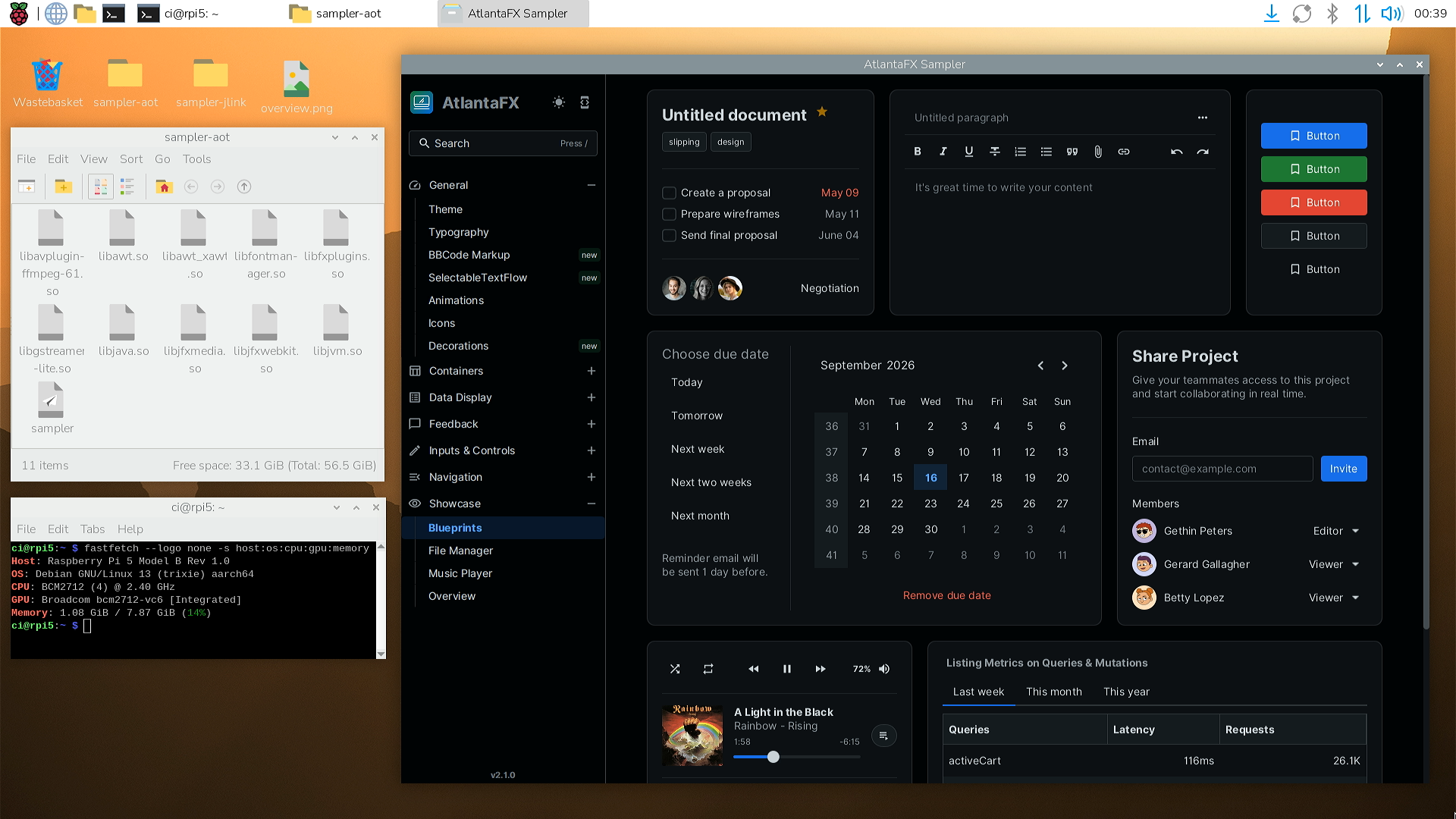
We initially used GraalVM Native Image as a way to deploy JavaFX to mobile targets. However, after seeing our mobile apps feel snappier than our desktop apps, we gradually migrated all of our GUI and CLI applications over to ahead-of-time (AOT) compilation. GUIs mostly run in interpreted mode (users would have to click thousands of times to reach the JIT threshold), and with AOT we see up to 90% reductions in startup and first visit times, which results in a noticeably better user experience.
| AtlantaFX Sampler (RPi5) | jlink (JIT) | jlink + CDS (JIT) | Native Image (AOT) |
|---|---|---|---|
Distribution size | 139 MB | 155 MB (+12%) | 124 MB (-11%) |
Time to first window | 3.6 s | 2.7 s (-26%) | 0.5 s (-86%) |
First visit: HTMLEditor (WebView) | 2.39 s | 2.31 s (-3%) | 0.22 s (-91%) |
First visit: Overview (FXML) | 1.90 s | 1.50 s (-21%) | 0.32 s (-83%) |
Private memory after startup | 224 MB | 244 MB (+9%) | 164 MB (-27%) |
Private memory after all pages | 1424 MB | 1396 MB (-2%) | 634 MB (-55%) |
In fact, starting the AtlantaFX sampler on a high-end Ryzen 9 9950X desktop with jlink + CDS takes more than 2.5 times as long (1.3 s) as the same application running AOT-compiled on a tiny Raspberry Pi 5 (0.5 s, see benchmarks). The whole run is captured in a short video walkthrough of all pages, including FXML, WebView, MediaPlayer, and AWT integration.
JavaFX actually works very well in Native Image once everything is configured, but getting a complex application running for the first time is typically not a straightforward experience. This steep initial hurdle has unfortunately earned JavaFX, and desktop Java in general, a reputation of being incompatible or working poorly with Native Image. I think a big part of this stems from complex, specialized tooling that performs a lot of "magic" behind the scenes to hide the native layers. Whenever anything breaks, it produces errors that many Java developers don’t know how to debug.
In this post I want to demystify the internals of these tools, and show why we built our own tooling to run the latest JavaFX 27 release with the latest enterprise Oracle GraalVM on desktop targets.
Three Approaches
Unlike frameworks such as Quarkus or Micronaut that were designed for ahead-of-time compilation and controlled server environments, JavaFX is a large and highly dynamic GUI framework that long predates native-image and needs to run on arbitrary client machines with different operating systems. Making that whole stack work requires a dedicated solution with linker fixes, substitutions, and nearly a thousand metadata entries. Gluon’s Substrate and BellSoft’s Liberica NIK are the two established options, and we just released StaticFX as a third.
Gluon Substrate
Gluon’s Substrate is a complex toolchain that can port JavaFX to just about anything, including Windows, macOS, Linux, and the mobile targets iOS and Android. It can create executables with and without JavaFX, shared and static libraries, deal with resources, add custom C extensions, build OS-specific bundles and installers, and even do remote deployments to small targets via ssh.
Getting all of that to work requires modified builds and custom tools for practically every layer, starting at the GraalVM distribution to mobile tooling and dedicated Maven and Gradle plugins. The result is quite an impressive stack, and Gluon deserves credit for contributing a lot of the upstream changes that let JavaFX run everywhere.
However, the number of moving targets makes for a brittle combination that can easily break. According to Gluon: "every new release of iOS, Android, the AOT compiler, the JVM components or the JDK required patches and adjustments", so they have been pivoting towards OpenJDK Mobile. That is a more standard JDK + Leyden approach with an open-world model that removes the need for metadata and should significantly simplify the user experience.
That being said, the existing tooling still gets maintenance updates (see docs) and is comparably user-friendly considering the enormous underlying complexity. However, the latest versions Gluon currently supports are GraalVM 23 Community Edition (CE) and JavaFX 21, and there is currently no supported way to use a newer JavaFX release.
We’ve used Gluon’s tools internally for 1-2 years and still refer to it for mobile targets. JavaFX on mobile actually works far better than we originally expected, and it’s really nice to be able to deploy to all five targets with full 2D and 3D rendering as well as hot-reload of styling and layouts (see Mobile Scope).
A common point of confusion is the licensing model. Only their rich component libraries require a license, but the build tools are free to use for all platforms.
BellSoft’s Liberica NIK
BellSoft took a much more focused approach and created a GraalVM CE distribution dedicated to desktop apps: Liberica NIK (full). If you need to get something running quickly, NIK is the easiest way to get started.
Their distribution bundles JavaFX and Swing/AWT modules, as well as corresponding metadata for both. Users only need to set GRAALVM_HOME and can use it with GraalVM’s stock native-maven-plugin. Even a stock Oracle GraalVM ships the static AWT archives, but users have to generate the required metadata themselves.
At the time of writing, NIK (full) supports the LTS versions GraalVM 25 CE with JavaFX 25 and the GPU-accelerated pipelines on the four main desktop architectures. They currently do not support the software pipeline or linux-aarch64 targets. Neither Gluon nor BellSoft supports the media and web modules in a Native Image.
HEBI’s StaticFX
We have been using Liberica NIK for our desktop applications for about two years, and it has admittedly worked quite well. However, some of our applications measure latency at the sub-millisecond level, and we ran into issues with incorrect measurements because the community edition’s escape analysis eliminated far fewer allocations than HotSpot, on top of differences in GC behavior. Our worst allocation source turned out to be a simple new double[]{a,b} in Math::pow, which would never allocate on HotSpot.
Since the Oracle GraalVM (formerly Enterprise Edition) became free to use under the GFTC license in 2023, we wanted to switch to get better escape analysis, G1 GC on all platforms, and other enterprise-only features like profile-guided optimization (PGO).
We also needed to upgrade to a newer JavaFX version for hebi-charts, which exposes high-performance JavaFX visualizations through a native shared library to other languages like Python and C++. Our goal was to be able to generate graphics and images through SSH on a linux-aarch64 device using the Headless mode introduced in JavaFX 26 with the software pipeline.
Neither Substrate nor Liberica NIK supports that specific combination, so we ended up creating StaticFX. In a way, the decoupling of JavaFX from the JDK turned into a nice benefit because it can be treated like a normal library that we can update at will without needing vendor support.
Rather than taking over the build system, StaticFX runs as a regular GraalVM Feature on the stock toolchain, and can pass all the required configurations to native-image without modifying any of the jfx sources. It also supports dynamic linking where static linking is not available, so it can support all JavaFX modules, including Media, Web, and Swing interop.
It consists of two artifacts: jfx-static-libs for version-specific static archives and metadata, and jfx-static-feature for the relatively version-agnostic glue. GraalVM automatically picks up configuration files from artifacts on the classpath, so users only need to add two dependencies next to the org.openjfx jars:
<dependency>
    <groupId>us.hebi.graalvm</groupId>
    <artifactId>jfx-static-feature</artifactId>
    <version>1.0</version>
</dependency>
<dependency>
    <groupId>us.hebi.graalvm</groupId>
    <artifactId>jfx-static-libs</artifactId>
    <version>${javafx.version}</version>
    <scope>runtime</scope>
</dependency>
The StaticFX repository contains detailed documentation and examples.
StaticFX can only target platforms that GraalVM supports. Mobile targets require cross-compilation and currently can’t be done without custom build tools like Substrate.
Three Problems
Regardless of the tooling, several layers have to work together to make JavaFX run as a native image. All of the "magic" boils down to solving three problems:
Reachability metadata: Native image uses a closed-world assumption, so every resource, class, and method that gets accessed reflectively at runtime needs to be known at build time (e.g.
reachability-metadata.json). The metadata consists of two separate parts: the metadata specific to the user’s application, and the generic metadata for the underlying engine. The engine metadata is tied to the JavaFX version and operating system.The static binaries: Roughly half of JavaFX is C/C++/Objective-C code (windowing, rendering, fonts, image loading, effects). A self-contained executable needs these libraries compiled and linked in as static archives. jfx already supports building the archives via
-PSTATIC_BUILD=true, but they currently don’t get published.Static integration glue: A few things work differently under AOT and need to be bridged with glue code. The static archives are baked into the image at build time rather than loaded at runtime, so the native code has to be registered, linked, and initialized differently, and each of these steps comes with its own pitfalls.
Next, we’ll go over how each approach solves each part:
| Gluon Substrate | Liberica NIK | StaticFX | |
|---|---|---|---|
Metadata | JSON files | patches in | annotations→JSON |
Static libraries | swaps in their version | bundled | user specified |
Integration glue | code in the | patches in | GraalVM feature |
Application Metadata
The application part of the metadata is independent of the build solutions that are the focus of this blog post, but it’s by far the most common problem from a developer’s perspective, so I want to cover it before the engine parts.
On the application side, most of the reflection and resource loading comes from FXML and CSS. Desktop applications load many types of files at runtime (e.g. .css, .fxml, .png, .jpg, .ttf) that need to be included in the native image, and the metadata also needs to cover side-effects such as importing other resources or reflectively instantiating classes (e.g. @import, -fx-skin, fx:controller).
The corresponding metadata lives in a reachability-metadata.json file that is hard to maintain manually and keep in sync. The typically recommended way to create the metadata is GraalVM’s tracing agent, which attaches to a normal JVM run and traces all reflective accesses. That works reasonably well for a backend service with an automated test suite that hits every endpoint, but it is a major pain for GUI apps. Developers would have to click through every feature on every operating system, and redo it every time the app changes.
By default, missing items can fail silently or with rather unhelpful runtime errors, e.g., a missing FXML file:
Caused by: java.lang.IllegalStateException: Location is not set.
        at javafx.fxml.FXMLLoader.loadImpl(...)
GraalVM for JDK 23 added the opt-in --exact-reachability-metadata build flag that turns missing registrations into detailed instructions:
Caused by: com.oracle.svm.core.jdk.resources.MissingResourceRegistrationError: Cannot access resource at path 'sampler/hello.png'. To allow this operation, add the following to the 'resources' section of 'reachability-metadata.json' and rebuild the native image:

    {
      "glob": "sampler/hello.png"
    }
Note that this also fails when looking up optional files that don’t exist, such as the binary .bss versions that JavaFX checks whenever loading a stylesheet. Fortunately, globs are accepted (only in -Areachability.outputFormat=1.2.0), so this can be worked around with a single @Reachable(resources = "/sampler/*/.bss").
In practice, nearly every issue we encountered in production was due to agent data becoming stale. It got annoying enough that we created reachability-annotations, which let us define metadata via annotations that live next to the source of truth and are regenerated on every build:
// Whenever this class is included, the resources are automatically added
@Reachable(resources = { "images/*.png" })
public class ImageLoader {}
We also added some JavaFX-specific annotations that automatically parse FXML/CSS files and generate appropriate metadata for everything they reference:
@ReachableFxResources({
        "/assets/images/*.png",
        "views/**/*.fxml",
        "views/**/*.css",
})
public class MyApp extends Application {}
With a few annotations we can make all gluon-samples (see unmerged PR) run out of the box on all platforms without ever running an agent. Even our most complex apps do not use the agent anymore outside of explorative runs. By default, all entries are conditional, so unused views do not increase the image size.
Unfortunately, there are still some third-party libraries that are notoriously hard to get running, e.g., some reflection-based parsing libraries, and they may need to be replaced with something more compatible. Note that this is not specific to JavaFX, but it remains a pain point for native images in general.
Problem 1: Engine Metadata
Unlike the application metadata, the engine metadata is constant for a specific version and operating system. Users see a pure Java API, but internally there is a lot of native code for dealing with OS behavior and rendering pipelines, and a lot of reflection to pick appropriate implementations at runtime. Between the reflection, JNI, and resources (shaders, css files, fonts, etc.), it currently takes close to 1,000 metadata entries to cover the whole framework.
Additionally, a lot of the metadata only applies to specific operating systems. Many of the platform-specific classes (e.g. WinApplication.class) get filtered out of the platform jars, but a few classes (e.g. platform fonts) are always available. Adding those unnecessarily bloats the native-image and can create build issues.
The metadata cannot be generated with the tracing agent as it is impossible to cover all possible paths in a single application. The shaders and effects alone form a large family of generated classes, each run is limited to a single pipeline, and some accesses even depend on the class loading order. Therefore, this metadata needs to be curated in some way, and ideally use wildcards to cover all shader resources at once.
Substrate bundles JSON metadata with their downloaded fx jars (META-INF/substrate/config/reflectionconfig.json), and adds a custom mechanism that conditionally appends target-specific metadata before handing it to native-image (e.g. reflectionconfig-x86_64-linux.json and -javafxsw when enableSWRendering is set). Only Substrate reads these files, so the metadata does not work when using the stock native-maven-plugin.
Liberica NIK does not ship any JSON files, but they heavily extended the JavaFXFeature in the svm.jar and register rules directly from code. The metadata is tied to the bundled jfx version, and the conditions are generated using Platform.includedIn checks and triggers on specific classes.
StaticFX ships conventional JSON files with conditions that approximate OS filtering, e.g., typeReachable = ${OS}Application.class. This is compatible with the stock tooling, so it works out of the box with any current GraalVM release. The metadata itself is currently generated using @Reachable annotations in a jfx fork and updated once per release.
I considered trying to get the annotations upstream, but merging them would require a build-system change with a dependency on an external annotation processor, and it would create an expectation that OpenJFX officially supports native-image, which would be a big commitment. Now that the initial metadata is figured out (~315 annotations in ~280 files generating ~1,000 entries), it only takes a few hours to cover a new release and run through the automated test suite. We designed it for ease of maintenance and documented the process in jfx-static-libs. We plan to release new builds in a timely manner, but it’s possible to create your own builds to avoid relying on third-party updates. We are currently limited to generating the older 1.0.0 metadata format because the |
Missing metadata fails rather annoyingly at runtime. The failures range from hard crashes (e.g. segfaults on missing classes) to silently producing bad rendering artifacts (e.g. missing the peer for the BoxShadow effect). To capture issues early, we set up a verification project that executes as many code paths as possible, including 2D and 3D scenes, effects, dialogs, popups, and rich text. Each scene exports screenshots that undergo automatic pixel checks and are exported for manual side-by-side verification. The executable can also be pointed at different pipelines (-Dprism.order=d3d/es2/mtl) to verify that their results all match. Beyond the synthetic tests, we also check the AtlantaFX sampler and our own internal applications like Scope.
Problem 2: The Static Libraries
The static binaries are primarily a distribution problem. Upstream OpenJFX has supported static builds for most modules (no media or web) via -PSTATIC_BUILD=true for years, but has never published the resulting archives. Users have to rely on third-party vendors or do the native build themselves. This gets complicated by the fact that the versions have to be an exact match, i.e., the static libraries have to be based on the same commit as the runtime jars.
Substrate downloads Gluon’s own static JavaFX SDK and silently replaces the user-specified JavaFX jars before invoking native-image. This ensures matching jars and archives, but it is impossible to use newer versions. Even if you specify jfx 27, the build tools will use jfx 21. Substrate defaults to only including the hardware pipelines, but it offers an opt-in to include the software fallback via the enableSWRendering flag.
Liberica NIK fixes the version by bundling the JavaFX modules with their jdk, which takes precedence over any org.openjfx jars declared in the build. They support the LTS releases, so the latest is currently JDK 25 + JavaFX 25. Note that their JavaFX build contains some minor source patches that are not published. Their feature omits the software pipeline, so applications fail on machines without a qualifying GPU.
StaticFX works with the official org.openjfx release jars and provides accompanying static builds that were built from the same commit. The builds currently live in my openjfx fork at jfx and contain no changes to the Java or native code beyond the annotations. Each release adds one commit for setting up the annotation processor, and a second that adds annotations for generating the metadata. The output format matches Substrate’s in case it ever accepts custom download urls. The static archives are actually reasonably small, so for the artifact on Maven Central we bundle all 5 platforms (including linux-aarch64) plus metadata into a single ~10 MB jar without classifier. The archives are only used by jfx-static-feature, so the artifact can be used as a standalone dependency purely to add reachability metadata.
Problem 3: Integration Glue
Lastly, we need the glue required for adding the actual linking arguments and fixing some pitfalls that show up during static linking.
Substrate owns the entire build chain, so all linker arguments live inside their build tool.
Liberica NIK works with GraalVM’s stock native-maven-plugin, but ships a heavily modified JavaFXFeature inside their svm.jar that registers the libraries and metadata for the bundled JavaFX version.
StaticFX was designed to work with the stock build tool and zero source changes, so any integration glue has to be implemented as a custom Feature. The feature gets picked up from the classpath automatically, extracts the platform-specific archives, checks that they match the runtime version, and adds the necessary linker commands for the static libraries and their system dependencies.
Static Linking
Statically linked JNI code can get into the image in two different ways. The simple route is forcing the entire archives into the executable, e.g., via /WHOLEARCHIVE on Windows, -force_load on macOS, or --whole-archive on Linux. The Java_* entry points are exported symbols, so they end up in the executable’s own export table, and the image resolves them at runtime with the same lookup a JVM uses for statically linked JNI (JEP 178). This disables build-time verification and includes all object files, independent of whether they get used or not.
The alternative is registering the archives as built-in JNI libraries, the same mechanism GraalVM uses for the JDK’s own libraries. Native-image then emits a link-time reference for every reachable native method, so the linker pulls in only the objects that are actually needed. The verification happens at build time, so a genuinely missing implementation fails early.
Historically, the glass library in OpenJFX reported lower JNI versions. Since GraalVM 25 strictly enforces JEP 178’s minimum JNI_VERSION_1_8 for static linking, the official sources are not compatible until this is updated upstream.
Substrate forces whole archives on Windows and macOS, but on Linux their internal GluonFeature does the built-in registration. The highest supported GraalVM version is 23, so the JNI version is not an issue.
Liberica NIK does the built-in registration for all platforms. Their bundled glass build is patched to report JNI_VERSION_1_8.
StaticFX also does the built-in registration for all platforms, and we rely on GraalVM substitutions to patch the call sites to ensure compatibility without changing the actual sources.
Linking Missing Symbols
As mentioned in the metadata section, a few platform-specific classes are present in every platform’s jar even though their native code is not. Out of the 95 graphics classes that declare native methods, this only applies to six classes related to font rendering, as well as the iOS image loader.
Unfortunately, even with perfectly provided metadata, users can easily cause issues by e.g. committing agent-generated files and building on another platform. Until those classes are added to the upstream exclude list, making e.g. the macOS CoreText font backend reachable on Windows breaks the build with 55 unresolved symbols even though none of them are needed. The missing symbol errors give the impression that the binaries were not compiled correctly, rather than highlighting a metadata issue.
helloworld-graal.obj : error LNK2001: unresolved external symbol
                       Java_com_sun_javafx_font_coretext_OS_CFArrayGetCount
[... 54 more unresolved CoreText symbols ...]
helloworld-graal.exe : fatal error LNK1120: 55 unresolved externals
One possible fix would be covering the missing symbols with small C stubs, similar to what Substrate does for some missing JDK symbols on its mobile targets. However, the font backends alone would come out to dozens of stubs per platform that would need to be bundled with the archives and maintained.
Substrate's whole-archive linking avoids the problem on Windows and macOS: wrong-OS classes are tolerated the same way a JVM tolerates them, and as long as they never get called, they only add some image bloat. An implementation that is genuinely missing only shows up on the first call as an UnsatisfiedLinkError:
java.lang.UnsatisfiedLinkError: Can't load library: javafx_font_pango
java.library.path = [...]
On Linux their GluonFeature registers a curated prefix list that leaves out the wrong-OS font backends, so their symbols are never referenced.
Liberica NIK uses their JavaFXFeature to register curated prefix lists for each platform, so the native methods are bound at link time. Wrong-OS classes that enter the image through bad metadata get treated as regular JNI, so they add some image bloat but do not break the build.
StaticFX registers a combined prefix list and uses GraalVM’s @Delete substitution to delete the wrong-OS classes. Leaving them unregistered would only downgrade them to regular JNI that stays in the image and fails at runtime. Deleted classes are removed from the analysis entirely, so bad metadata never reaches the linker, and a code path that does hit a deleted class fails with a more meaningful UnsupportedFeatureError instead of an UnsatisfiedLinkError:
@Delete
@TargetClass(onlyWith = {NotLinux.class, ClassPresent.class},
    className = "com.sun.javafx.font.freetype.FTFactory"
)
static final class Target_FTFactory {}
The conditions are negations (NotLinux, NotMacOS) combined with an existence check (ClassPresent), so a future platform port fails visibly instead of running a stubbed-out backend.
Media, WebView, and Swing
Both Substrate and Liberica NIK omit the media and web modules because their native dependencies (GStreamer and WebKit) are incredibly difficult to build statically. Since that is unlikely to ever change, dropping the modules entirely seemed unnecessarily restrictive to us.
On a standard JVM, these modules already load their binaries dynamically from the platform jars, and nothing prevents a native image from doing the same. The feature simply extracts the matching shared libraries (.dll, .so, or .dylib) from the classpath to the output directory and adds the appropriate linker arguments. Applications that require web or media can’t be built as self-contained executables, but that seems like a reasonable tradeoff.
Our javafx.swing metadata covers the pure Java interop glue. While full SwingNode utilization requires additional metadata for the JDK’s internal AWT systems, we have successfully verified it working across all five platforms using just two @Reachable annotations. However, that remains an example rather than something we actively support.
Remaining Glue
Beyond the deletions, StaticFX also contains a small number of substitutions that work around remaining gaps between GraalVM and a statically linked JavaFX. Several of them are latent issues that wouldn’t show up on a JVM, but should be fixed upstream. I only checked how Gluon and NIK handle some of them:
GraalVM
Overloaded native methods never link: native-image resolves builtin JNI methods by their short name, and an overloaded native only exists under its signature-mangled name on the C side, as the JNI spec requires (relevant to three classes). We added
@CFunctionsubstitutions to manually route them to the mangled symbols. BellSoft works around this with source patches that rename the overloaded natives (e.g.,CreateFontFace→CreateFontFaceIndexed), and Substrate is unaffected due to lazy resolution on Windows and macOS (falls back to the mangled names at runtime), and none of the classes being relevant on Linux.GraalVM’s built-in JavaFX support registers
Applicationsubclasses for reflection, but not the no-argument constructor called by the launcher. JavaFX Native Images currently fail at startup withNoSuchMethodException: MyApp.<init>()unless the application registers itself, so our feature registers the constructor of each reachable subclass.
OpenJFX
System.loadLibrarycannot initialize any of the static JavaFX libraries. Loading the unpatched glass as a built-in library fails withUnsatisfiedLinkError: Unsupported JNI version 0x10006, required by glass. On Linux and macOS, theJNI_OnLoad_<lib>entry points are additionally hidden by the image’s exported-symbol list, so the feature calls the initializers directly instead.Objective-C categories are dropped from static links (standard linker behavior, as categories produce no symbols the linker tracks as dependencies), which shows up as an
unrecognized selectorexception when the first window opens.libglass.ais linked with-force_loadto keep them.On macOS, the process hangs before the first window appears. Cocoa requires the process’s first thread to be running a CFRunLoop while glass starts up. The
javalauncher handles this, but a native image runsmainon the first thread. We can substitute a handoff to coverApplication::launch, butPlatform::startupcurrently needs an external native launcher.JavaFX qualifies GPU support against a vendor allowlist that does not include Broadcom, so the es2 pipeline on a Raspberry Pi requires
-Dprism.forceGPU=trueto avoid falling back to software rendering.Files shipped inside the image load using the
resource:scheme, but the Media player on macOS only checks forjar:andjrt:, and hands the url to AVFoundation to get an error.
Benchmarks
Application Size
A minimal application generated with StaticFX and optimized for size comes out to about 33 MB (12 MB zipped), which is roughly two thirds less than a minimal default jlink runtime at 98 MB (32 MB zipped), and still 43% less than the 59 MB of one with maximum compression (--compress zip-9).
The table below has the minimal sizes for the highest supported version for all three approaches. Note that the numbers are not directly comparable due to different JavaFX versions and varying optimizations across different GraalVM versions.
| HelloFX | Gluon Substrate | Liberica NIK | StaticFX |
|---|---|---|---|
GraalVM | Gluon 23 CE | Liberica 25 CE | Oracle 25.3 |
JavaFX | 21 | 25 | 27 |
Default optimizations ( | |||
Windows x86_64 | 64.5 MB | 45.3 MB | 45.9 MB |
Linux x86_64 | 69.8 MB | 47.1 MB | 52.0 MB |
macOS aarch64 | 65.9 MB | 68.6 MB | 46.0 MB |
Optimized for size ( | |||
Windows x86_64 | 60.1 MB | 36.5 MB | 30.8 MB |
Linux x86_64 | 65.8 MB | 38.4 MB | 33.4 MB |
macOS aarch64 | 61.8 MB | 57.5 MB | 32.3 MB |
Responsiveness
Most of the difference is in the first impression. On the desktop, the JIT eventually catches up, but startup and the first visit of every page still go through class loading and the interpreter. We measured the AtlantaFX sampler on JavaFX 27 as jlink, jlink with a trained CDS archive, and a native image, on a fast desktop and a Raspberry Pi 5:
| AtlantaFX Sampler | jlink | jlink + CDS | Native Image |
|---|---|---|---|
Ryzen 9 9950X (D3D) | |||
Time to first window | 1558 | 1269 | 501 |
Overview (FXML) | 402 → 102 | 315 → 103 | 100 → 52 |
HTMLEditor (WebView) | 852 → 34 | 819 → 34 | 34 → ~20 |
Typography | 99 → 34 | 100 → ~20 | 50 → 34 |
Raspberry Pi 5 (SW) | |||
Time to first window | 3566 | 2655 | 495 |
Overview (FXML) | 1901 → 768 | 1500 → 661 | 324 → 250 |
HTMLEditor (WebView) | 2388 → 269 | 2309 → 262 | 224 → 201 |
Typography | 397 → 302 | 422 → 302 | 262 → 241 |
After the initial class loading, the JIT closes most of the gap on the desktop, while the Pi stays noticeably faster under AOT.
Note that FXML loads significantly faster under AOT even after multiple calls. Our own applications are built almost entirely on complex nested FXML files that get loaded reflectively. In the past we have considered converting FXML to bytecode to improve performance, but Native Image has made that unnecessary for us.
Each machine was measured with its default pipeline, i.e., D3D on the desktop and the software pipeline on the Pi 5 (the V3D GPU is not in the vendor allow-list). The native images use the default Serial GC without PGO, and the CDS archives were trained on all measured pages. Timings come from external screen capture: a page load counts from the click until the content starts to appear, taking the median of 3 runs at 16 ms capture resolution on the desktop and ~50 ms on the Pi. Entries with ~20 ms had already switched in the first capture after the click.
Conclusion
I hope that it became clearer how JavaFX interacts with Native Image and what some of the potential errors mean. I often see people complaining that Native Image supposedly only works for HelloWorld toy examples, so I hope that using the AtlantaFX sampler without a tracing agent sufficiently demonstrates the ability to reliably run complex applications. I know that Gluon has been pivoting towards OpenJDK Mobile, but I still think a fully compiled Native Image is a better fit than Leyden’s AOT cache for desktop apps deployed on user PCs.
Getting a desktop application AOT compiled for the first time is still a challenge, but IMO the payoff is worth pushing through the initial barrier. The single biggest issue is the lack of metadata for common JavaFX libraries and the application itself, but hopefully our reachability-annotations with dedicated FXML support can make that more approachable and maintainable. Even the AtlantaFX sampler that uses practically every existing component only needed a few annotations for full compatibility.
A second remaining issue is the reliance on (old) third-party libraries that fundamentally don’t play well with the closed-world assumption in native-image. The ecosystem has been moving towards libraries that are more compatible, but switching libraries is always a pain. We will see how project Crema and its open-world model will be able to help with that.